Curtis.Castiglione@ROzebra.com

How to Maintain an Automotive Scan Tool
Modern vehicles are essentially rolling computers. When a warning light appears on your dashboard, you are no longer limited to guessing what might be wrong under the hood. An automotive scan tool allows you to "talk" to your car, providing a window into its complex electronic systems.
Whether you have a basic code reader or a high-end diagnostic tablet, these devices are precision instruments rather than simple hand tools. Because professional-grade versions can represent a significant investment, knowing how to maintain an automotive scan tool is vital to ensuring it remains accurate and functional for years to come.

What Is an Automotive Scan Tool?
An automotive scan tool is an electronic device used to interface with a vehicle’s onboard computer systems. Since 1996, almost every car and truck sold in the United States has been equipped with a standardized diagnostic system known as OBD-II (On-Board Diagnostics II).
The scan tool plugs into a specific 16-pin port—usually located under the dashboard on the driver’s side—to retrieve data from the vehicle. While many people associate these car diagnostic tools with "checking engine lights," they are specialized computers designed to survive the harsh environment of a garage while providing technical data that would otherwise be invisible to a vehicle owner.
What Does an Automotive Scan Tool Do?
The primary job of a scan tool is to communicate with the vehicle's Electronic Control Units (ECUs). When a sensor detects a problem—such as a misfiring spark plug in a Chevrolet Silverado or a faulty oxygen sensor in a Toyota Camry—the ECU stores a Diagnostic Trouble Code (DTC).
The scan tool retrieves these codes so you know where to start your repair. Beyond reading codes, many automotive tools can display "live data." This allows you to see exactly what the engine is doing in real-time, such as the coolant temperature, engine RPM, or fuel trim levels. High-end professional automotive equipment can even perform "bi-directional" tests, meaning the tool can tell the car to perform a specific action, like turning on a cooling fan or clicking a fuel injector, to verify if a component is working.
How Is an Automotive Scan Tool Used?
Using a scan tool is generally straightforward, but it requires a specific sequence to protect the electronics and ensure accurate communication:
- Locate the Port: Find the OBD-II port. In most cars, it is within two feet of the steering wheel.
- Connect: With the ignition off, plug the scan tool’s connector into the port.
- Power On: Turn the vehicle’s ignition to the "On" position. Some tools draw power directly from the car, while others use an internal battery.
- Navigate: Select your vehicle’s make, model, and year on the screen to help the tool understand which communication protocol to use.
- Diagnose: Choose to "Read Codes" or "View Data Stream" depending on your goal.
- Shutdown: Once finished, navigate back to the home screen before unplugging. This prevents data corruption, much like "ejecting" a USB drive from a computer.

When Would You Need an Automotive Scan Tool?
You would typically reach for these mechanic tools whenever a warning light appears on the dash, such as the Check Engine Light, ABS (Anti-lock Braking System) light, or Traction Control light.
However, they are also useful for routine maintenance. For example, if you own a modern European car, you might need a scan tool just to reset the "Service Due" reminder after an oil change or to retract the electronic parking brake calipers when replacing rear brake pads. Many DIY automotive tools are also used during a pre-purchase inspection to see if a seller recently cleared error codes to hide a persistent problem.
How to Maintain an Automotive Scan Tool
To keep your diagnostic device in peak condition, you should treat it more like a high-end tablet than a heavy-duty wrench. Here are the best practices for maintaining your equipment.
Protect the Screen and Housing
Most modern car diagnostic tools feature large touchscreens. These are susceptible to cracking if dropped or if a heavy tool is placed on top of them. Always store the tool in its dedicated hard-shell case when not in use. If your tool didn't come with a case, keep it in a clean, padded drawer in your toolbox. Avoid using harsh chemicals to clean the screen; a slightly damp microfiber cloth is usually enough to remove greasy fingerprints without damaging the anti-glare coating.
Proper Cable Management
The diagnostic cable is the most common point of failure for automotive equipment. These cables are subjected to repeated bending and pulling. Never pull the tool by the cord to move it closer to you. When disconnecting the tool from the vehicle, always grasp the plastic connector body rather than yanking on the wire. Inspect the pins inside the connector regularly; if they become bent or dirty, the tool will fail to communicate with the car.
Keep the Software Updated
Vehicles are constantly evolving, with manufacturers releasing new communication protocols every year. To ensure your tool can talk to a brand-new truck or a specific hybrid system, you must follow the manufacturer’s software update schedule. Updates often add new vehicle coverage and fix bugs. This is a critical part of knowing how to maintain an automotive scan tool because, without the latest software, the hardware eventually becomes obsolete.
Battery Care and Temperature Control
If your scan tool has an internal rechargeable battery, do not allow it to sit completely dead for months. This can permanently reduce the battery’s capacity to hold a charge. Conversely, extreme temperatures are the enemies of electronics. Leaving an expensive scan tool in a hot car during the summer can damage the processor or cause the screen to delaminate. Always store your vehicle repair tools in a climate-controlled environment when the job is done.
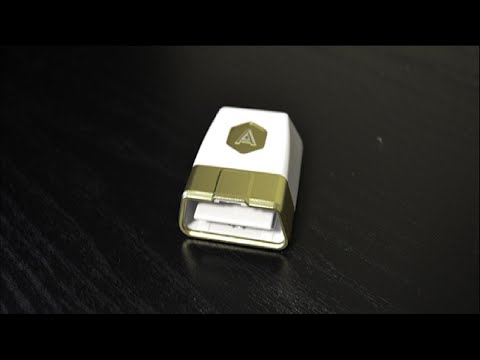
Types of Automotive Scan Tools
There are three main categories of these garage tools:
- Basic Code Readers: Inexpensive, handheld devices that only read and clear basic engine codes. They are perfect for beginners who just want to know why a light is on.
- DIY Diagnostic Tablets: Often running on Android, these offer features like graphing live data or performing maintenance resets. They are designed for the dedicated enthusiast who does their own repairs.
- Professional Scan Tools: A major investment found in repair shops. They offer full system access (Airbag, Transmission, Body Control) and bi-directional controls to test individual components.
What Should You Look for When Choosing One?
When selecting car diagnostic tools, compatibility is the most important factor. Ensure the tool supports the specific makes and models you own. Some tools are universal, while others are specialized for specific brands like Volkswagen or BMW. Look for a tool with a clear, backlit display and a sturdy connector. If you plan on doing your own repairs, a tool that provides "freeze frame" data—which shows exactly what was happening the moment the fault occurred—is incredibly helpful for troubleshooting intermittent issues.
DIY vs. Professional Use
For the average vehicle owner, a mid-range DIY scan tool is usually the right choice. It provides enough information to troubleshoot most common issues without the multi-thousand-dollar price tag of professional units. Professionals need tools that can program new keys, recalibrate ADAS sensors, or perform complex ECU flashing—tasks that most beginners will never need to perform.
Common Mistakes When Using an Automotive Scan Tool
One of the most common mistakes is assuming that a code tells you exactly which part to replace. For example, a "Lean Condition" code does not automatically mean you need a new oxygen sensor; it could be a vacuum leak or a clogged fuel filter. Use the tool as a guide and a starting point for further inspection, not a final answer.
Another mistake is failing to fully seat the connector. If the pins don't make a solid connection, the tool might report a "Communication Error," leading you to believe there is a major problem with the car’s computer when the issue is simply a loose plug.
Safety Considerations
While scan tools are generally safe, there are a few rules to follow. Never attempt to use a scan tool while you are actively driving the vehicle. Distracted driving is a major safety hazard. If you need to record live data while the car is moving, have a passenger hold the tool and monitor the screen. Additionally, be careful with the cable placement; ensure it does not get tangled in the brake or gas pedals while you are testing the car.
Frequently Asked Questions
1. Can a scan tool fix my car? No, a scan tool is a diagnostic device. It identifies the problem and can clear the warning light, but if the underlying mechanical or electrical issue isn't repaired, the light will simply return once the car completes a drive cycle.
2. Will a scan tool work on any car? Most scan tools work on all OBD-II compliant vehicles (1996 and newer in the US). However, for older vehicles (OBD-I), you may need specific adapters and a tool that supports older, manufacturer-specific protocols.
3. Do I need an internet connection to use a scan tool? Most basic functions do not require the internet. However, updating the software or looking up specific repair databases through the tool usually requires a Wi-Fi connection.
Conclusion
An automotive scan tool is one of the most powerful vehicle repair tools a modern DIYer or professional can own. It saves time, reduces guesswork, and helps you understand the overall health of your vehicle. By learning how to maintain an automotive scan tool—from protecting the screen to handling cables with care—you ensure that your investment is always ready when that pesky dashboard light starts glowing. With proper care, these mechanic tools will remain a reliable part of your garage tools for many years to come.



No Comments Yet
Be the first to comment on this article.